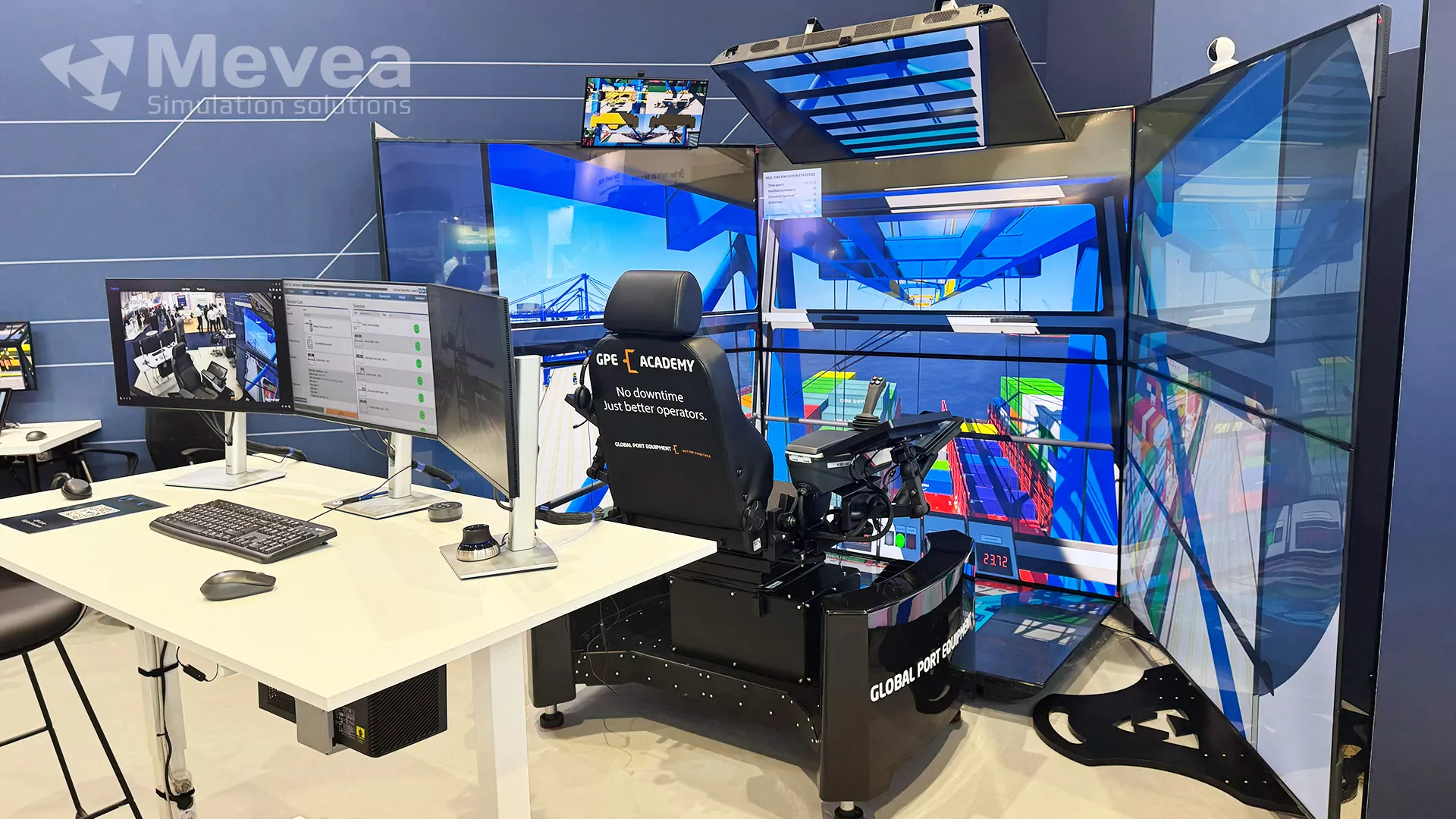
When replacing an RTG or STS simulator, prioritize physics fidelity, hardware scalability, and software that reflects how your actual equipment behaves. The most important factors are realistic crane dynamics, a flexible hardware lineup that matches your training budget and goals, and a vendor who can support you long after installation. If your current simulator is aging or underdelivering, the sections below cover exactly what to evaluate before committing to a replacement.
What has changed in RTG and STS simulator technology recently?
Simulator technology for port crane training has advanced significantly over the past decade. Modern RTG and STS simulators now use physics-based engines that replicate crane mechanics, hydraulics, and load dynamics in real time, replacing older systems that relied on scripted animations or simplified motion models. The result is a training environment that behaves the way a real crane does, not just looks like one.
In 2026, the most notable shifts include deeper integration between simulator software and real control systems, the rise of remote-operated equipment training modules, and hardware platforms that range from compact desktop units to full-scale replica cabs. Instructor tools have also matured considerably. Modern instructor stations allow trainers to introduce weather changes, equipment faults, and scenario variations on the fly, giving operators exposure to conditions that would be difficult or dangerous to replicate on a live quay.
For terminals already running an older container terminal simulator, these advances mean the gap between what a legacy system can do and what a current platform offers is wide and growing. If your simulator was installed more than five to seven years ago, it is likely running on hardware and physics logic that has since been superseded.
What are the key features to evaluate in a replacement simulator?
The key features to evaluate in a replacement port crane simulator are physics accuracy, scenario flexibility, instructor control tools, hardware options, and long-term software support. Each of these directly affects whether the simulator will deliver measurable improvements in operator performance and whether it will remain useful as your fleet and training needs evolve.
- Physics engine quality: The simulator must replicate load swing, rope dynamics, wind effects, and equipment-specific behavior accurately. A generic physics model will not prepare operators for the real machine.
- Scenario library and customization: Look for a range of pre-built exercises covering loading, unloading, and fault conditions, as well as the ability to build custom scenarios for your terminal layout.
- Instructor station functionality: Real-time monitoring, the ability to inject faults or weather changes mid-exercise, and detailed post-session performance reports are essential for structured training programs.
- Hardware scalability: A vendor offering multiple hardware tiers lets you match investment to training objectives without being locked into one configuration.
- Software update roadmap: Ask directly how often the software is updated and whether updates are included in the support contract.
How does simulator fidelity affect operator training outcomes?
Higher simulator fidelity produces faster skill transfer to real equipment. When a port crane simulator accurately replicates the feel, response, and behavior of the actual machine, operators develop muscle memory and decision-making habits that apply directly on the job from day one. Low-fidelity systems can build incorrect habits that need to be unlearned.
Fidelity operates on two levels: visual and physical. Visual fidelity covers the realism of the environment, the terminal layout, the weather conditions, and the crane cab interface. Physical fidelity is about how the crane responds to inputs. Does the load swing the way it would in real life? Does the trolley decelerate correctly? Does the spreader behave differently in wind?
Physical fidelity is the more critical of the two for skill development. Operators who train on a system with accurate physics are better equipped to handle unexpected load behavior, recover from near-misses, and operate efficiently under time pressure. This is where investing in a heavy equipment training simulator built on a genuine physics engine, rather than a visually polished but mechanically simplified platform, pays off in real productivity gains.
What’s the difference between a desktop, cabin, and full-scale simulator?
The main difference between desktop, cabin, and full-scale simulators is the level of physical immersion they provide, which in turn affects training realism, cost, and deployment flexibility. Each tier suits different training objectives and budget levels.
Desktop simulators
A desktop simulator uses a standard monitor setup and a simplified control interface. It is cost-effective, compact, and easy to deploy with a small footprint, making it well-suited to classroom-based instruction, initial familiarization, theory-linked exercises, and group training sessions. Operators can build foundational knowledge and procedural understanding before progressing to higher-fidelity platforms.
Cabin simulators with motion platforms
A mid-range cabin simulator, such as a unit with a three-degree-of-freedom motion platform and multiple screens, delivers a substantially more realistic experience. The operator sits in a purpose-built seat, uses realistic controls, and receives physical motion feedback that mirrors crane movement, supporting muscle memory development and more advanced skill progression. This tier is effective for both initial training and recurrent proficiency checks.
Full-scale cab simulators
A full-scale replica cab provides maximum immersion. The operator trains inside a physical reproduction of the actual crane cab, with the same controls, the same sightlines, and the same spatial environment. This format is particularly valuable for STS crane training, where the height, perspective, and control layout of the real cab are difficult to replicate at a smaller scale. Mevea simulator solutions cover all three hardware tiers, including the Mevea Master King full-scale cab simulator, so terminals can choose the configuration that fits their training program without compromise.
Should you replace the whole simulator or just upgrade the software?
Whether to replace the entire simulator or upgrade only the software depends on the condition of your existing hardware and whether the underlying physics engine can be updated. If your hardware is structurally sound and the vendor offers a genuine software upgrade path, a software-only update may be sufficient. If the hardware is outdated, the physics model is no longer supported, or the vendor no longer provides updates, full replacement is the more cost-effective long-term decision.
A common situation for terminals switching vendors is that the original supplier has reduced support, stopped releasing updates, or the software architecture is simply too old to accept modern physics improvements. In those cases, patching the software delivers diminishing returns. The simulator will still behave like a legacy system regardless of cosmetic updates.
Before deciding, ask your current vendor for a concrete roadmap of what a software upgrade includes and what it excludes. If the physics engine itself is not being replaced, the training quality ceiling stays where it is. A full replacement with a modern platform typically delivers a better return over a five to ten year horizon than repeated partial upgrades to an aging system.
What questions should you ask a simulator vendor before buying?
Before committing to an RTG simulator replacement or STS simulator upgrade, ask the vendor specific questions about physics accuracy, support commitments, hardware flexibility, and integration with your existing training program. Vague answers to any of these are a warning sign.
- What physics engine does the simulator use, and how is it validated against real equipment? A credible vendor will be able to explain how their simulator matches the behavior of actual cranes, not just describe the visuals.
- What hardware configurations do you offer, and can we start at one tier and expand later? Flexibility matters, especially if your training needs will grow.
- What does the instructor station allow trainers to do in real time? Ask for a live demonstration, not just a feature list.
- How often is the software updated, and what is included in the support contract? Understand exactly what you are paying for after installation.
- Can the simulator replicate our specific equipment models and terminal layout? Generic scenarios have value, but a system that can mirror your actual operation produces faster skill transfer.
- What does your post-installation support look like, and where are your support teams based? Response time matters when a training program depends on the simulator being operational.
- Can we speak with existing customers in comparable terminals? Reference customers in your equipment category are a more reliable indicator than marketing materials.
Our port equipment simulators are built to answer all of these questions with specifics, not generalities. If you are evaluating a replacement for an aging container terminal simulator, our sales team is happy to walk through any of these criteria in detail.
Ready to find the right simulator for your terminal?
Choosing the right RTG or STS simulator replacement is a long-term investment in your operators, your equipment, and your terminal’s productivity. The Mevea sales team works directly with port operators and training managers to identify the configuration, hardware tier, and support structure that best fits your operation. Whether you have a specific requirement in mind or are still in the early stages of evaluation, we are ready to help you make a well-informed decision. Contact the Mevea sales team today to discuss your training needs and get a clear picture of what a modern simulator solution can deliver for your terminal.
This content was generated with the help of AI and it may contain mistakes